Search This Blog


Showing posts with label control statement. Show all posts

Friday, October 4, 2019

control statements including( infinite loop, break , continue, goto, switch)


Some more control statements :-

                            I.            Nesting of loops
      II.            Infinite loops
    III.            break statement
    IV.            continue statement
      V.            goto statement
    VI.            switch statement ( studied earlier )
                  
decision making statements in c
control statements

➤Nesting of loops :-

  •  When the loop is written inside the body of an another loop , then it is known as a nested loop.
  •  Any loop can written inside the any type of loop, there is no any special condition for it.

 example as :- forloop in for loop

   for ( initialization ; condition ; increment / decrement )
   {
     for ( initialization ; condition ; increment / decrement )
      {
         statements ;
        }
     }

P.example :- Program to print the series of perfect no.  upto 100.

#include<stdio.h>
#include<conio.h>
 void main()
 {
   clrscr();
   int i , j , sum =0 ;
   for ( i = 1 ; i <= 100 ; i ++ )
   {
     for ( j = 1 ; j < i ; j ++ )
      {
         if ( i % j == 0 )
         sum = sum + j ;
       }
      if ( sum == i )
       printf( “ %d \n “, i );
       sum =0 ;
   }
  printf( “ %d is the perfect no. “ , i );
 getch();
 }

➤Infinite loop :-

  • The type of loop that go on executing infinitely without terminating ,  is known as infinite loop.
  • These type of loops are stopped only by ending the program.
  • Some times these type of loops are written by mistake and sometime we use these loops in our program.

example of such mistake :-

   for ( i = 0 ; i <= 10 ; i --)
    printf ( “ %d “ , i );
  Here , this loop is infinite loop as it never terminaes because, the condtion given is less than or equal to 10 to terminate, but i initialized at 0 and decremented contuosly and never  become 10 or more than 10.  So it is execute infinitely.

➤break statement :-

  •  This statement is used when it becomes necessary to come out of the loop even before the loop condition becomes false,  at that time we use break statement to come out of the loop .
  •  This statement is used insisde the loops and inside the switch statements.
  • This statement cause an immediate exit from the loop.

Syntax:-

  break;

for examples visit switch statements (click for example).

➤continue statement :-

  • This statement is used when we need to go to the next iteration of the loop after skipping some statements of the loop.
  • Syntax :-

        continue ;
  • It is used with  a condition for when to skipping the statements .
  • When continue statement is encountered then the all remaining statement in the loop are not executed and the loop continues with the next iteration.

Difference between break and continue statement :-
When break is encountered then the loop terminates and moves to the next statement following the loop.
When continue is encountered then the loop isn’t terminated , only the next statements of the loop is skipped and the next iteration of the loop starts.

P. example:- Program to find the sum and average of 10 positive no.

#include<stdio.h>
#include<conio.h>
 void main()
  {
   clrscr();
   int  i =1 , n , sum = 0;
   float avg ;
   printf( “ Enter 10 positive no. “ );
    while ( i <= 10 )
     {
      printf( “ enter number %d : “ , i);
      scanf( “ %d”, &n );
      if ( n < 0 )
      {
        printf( “ enter only positive no.” );
        continue;
       }
        sum += n;
        i++;
      }
    avg= sum / 10.0;
    printf( “ sum = %d  Avg = %f \n “, sum , avg);
    getch();
  }

➤goto statement :-

  • This statement is an unconditional control statement that transfers the control to the another part of the program .

Syntax :-

  goto label ;
            ….
            …..
  label :
         statement
        .….
        …..
  • Here label is any valid identifier followed by colon.
  • When goto label ; statement is encountered then all  control is transferred to the statements which is immediately after the label.
  • It can be placed anywhere in the program, according to the need.
  • If the label is after goto statement then control is transferred forward and it is known as forward jump or forward goto.
  • If the label is before goto statement then control is transferred backward and it is known as backward jump or backward goto.
  • More than one goto can be placed with the same label but we cannot have the same label at more than one place.

P.example :- Program to find whether a no. is even or odd.

#include<stdio.h>
#include<conio.h>
 void main()
  {
   clrscr();
   int n;
   printf( “ enter a no. “);
   scanf( “ %d” , &n );
   
    if ( n%2 == 0 )
       goto even ;
    else
       goto odd;

    even:
          printf( “ number is even \n “ );
          goto end ;
    odd :
          printf ( “ number is odd \n “ );
           goto end ;
    end :
 printf ( “ \n “ );
getch();
 }

Monday, September 30, 2019

Looping statement OR Iterative statement


This statement is used to repeat a block of statements multiple times according to the specify condition.


Any loop consists of three parts :-

           I.            Initialization part
         II.            condition part
       III.            increment/ decrement part

⇒Types of Looping statements :-

  There are three loops in C and C++

                I.            for loop
              II.            while loop
            III.            do – while loop ( exit control loop )

➤For Loop :-

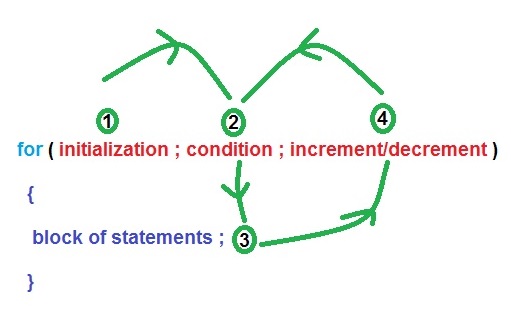
  •   In this loop we can specify initialization part , condition  and increment / decrement part at a time .
  •   It is a type of entry control loop because condition is checked first.
  •  At first initialization part is executed.
  •  After that condition is checked and then block of stmts is executed.
  •  And then after increment/ decrement is executed and again condition is checked , and the loop continued.

  Syntax :-

   for( initialization ; condition ; increment / decrement )
    {
      block of stmts;
      }
 
looping statement for loop
syntax of for loop 


example 1:-

    
   for ( i=1 ; i <= 100 ; i++ )
    {
      printf( “ %d \n “, i );
    }


Example 2:-

    
   i = 1;
    for(   ;  i <= 100 ;  )
   {
     printf( “ %d \n “ , i );
    i++;
    }

⏩Standard form of for loop

         
           I.            Infinity for loop
                for (  ;  ;  )
         {
           printf( “  Saurav “ ) ;
          }
           II.            for ( i=1 , j = 1 , k = 1 ; condition ; i++, j++ ,k++ )
{
  block of stmts ;
  }
         III.            for (  ;  condition  ;  )
{
  block of stmts ;
}

➤While Loop :-

  • In this loop all the three parts are specified separately.
  • It is a type of entry control loop because condition is checked first .
  • At first initialization part is executed.
  • After that condition is checked and then block of stmts is executed.
  • And then after increment/ decrement is executed and again condition is checked , and the loop continued.

Syntax :-

   initialization
  while( condition )
    {
     block of stmts ;
     increment/ decrement;
   }
looping statement whle loop
syntax of while loop

Example:-

   i=1;
  while ( I <= 100 )
  {
    printf( “ %d\n “, &i);
    i++;
  }

➤Do – While loop :-

  • In this loop all the three parts are specified separately.
  • It is a type of exit control loop because block of stmts is executed before the condition .
  • At first block of stmts  part is executed.
  • After that increment/ decrement part is executed .
  • Then after condition is checked , if it is true then the block of stmts is executed again and the loops continued.

Syntax :-

   initialization;
    do
  {
    block of stmts ;
    increment / decrement ;
   }
  while ( condition );
looping statement do while loop
syntax of do-while loop


Example :-

   i=1;
   do
   {
     printf( “ %d \n “, &I );
     i++;
    }
   while ( i <= 100 );


Let us know how different these loops are in programming.

P1. Program to print the series of natural no. upto 100 by for loop.

 #include<stdio.h>
#include<conio.h>
  void main()
 {
   clrscr();
   int i;
   printf( “ The series of natural no. upto 100 are \n “);
  for( i =1 ; i <= 100 ; i ++ )
    printf( “ %d \n “, i );
  getch();
 }
For loop programming of natural number
Program to print the 100 natural no.  By for loop

P2. Program to print the series of natural no. upto 100 by while loop.

  #include<stdio.h>
  #include<conio.h>
    void main()
   {
     clrscr();
     int i;
     printf( “The series of natural no. upto 100 are \n “);
      i=1;
      while( i <= 100 )
     {
      printf( “ %d\n “, i );
      i++;
     }
    getch ();
   }
While loop programming of natural number
Program to print the 100 natural no. By while loop

P3. Program to print the series of natural no. upto 100 by do - while loop.

  #include<stdio.h>
  #include<conio.h>
    void main()
   {
     clrscr();
     int i;
     printf( “The series of natural no. upto 100 are \n “);
      i=1;
       do
        {
         printf( “ %d\n “, i );
          i++;
         }
       while( i <= 100 );
    getch ();
   }
Do while programming of natural number
Program to print the 100 natural no. By do while loop


We practice more programs of looping statement further.

Friday, September 27, 2019

Switch case statement


  V. Switch  case statement

·         It is mainly used to match only character and integer type value.
·         Its execution is fast rather than else if ladder stmt.
·         It is generally used to create choice based program.
·         We can not check condition like if condition.

syntax:

switch ( variable / constant / expression )
{
   case < value 1 > :
  block of stmts;
  break ;
  case < value 2 > :
  block of stmts ;
   break ;
   
  
  case < value n > :
  block of stmts ;
  break ;
  default :
   block of stmts ;
 }
Switch case statement with syntax
Syntax of switch case statement 

Note :-

      a)      Case keyword is used to specify value.
b)      break keyword is optional which is used to terminate from switch stmts.
c)       default is optional part. It will be executed if any case does not match.

Example 1:-

  int digit =2;
  swirch ( digit )
 {
   case 0 :
   printf ( “ zero “);
   break;
   case 1:
    printf( “ one “ );
   break ;
  .…
  ….
  case 9 :
   printf ( “ nine “ );
   break ;
  default :
   printf ( “ Invalid digit “ );
  }

Example 2:-

  char ch = ‘E’ ;
  switch ( ch )
  {
   case ‘A’ :
   case ‘a’ :
   case ‘ E’ :
   case ‘e’ :
   case ‘I’ :
   case ‘I’ :
   case ‘O’ :
   case ‘o’ :
   case ‘U’ :
   case ‘u’ :
   printf( “ vowel character “);
   break ;
  default :
     printf( “ consonant character “ );
  }

P1.Program to input two numbers and any arithmetic operator after that performed arithmetic operation using switch case statement.

#include<stdio.h>
#include<conio.h>
  void main()
  {
   clrscr();
   int a , b;
  char opt ;
  printf( “ enter two numbers “ );
  scanf( “ %d %d “, &a ,&b );
   fflush (stdin);
   printf ( “ Enter any arithmetic operator “ );
   scanf( “ %c “, &opt);
   switch ( opt )
   {
     case ‘+’ :
    printf( “ Addition = %d “, a+b);
    break;
     case ‘-‘ :
   printf( “ Subtraction = %d “, a-b);
    break;
    case ‘*’ :
     printf( “ Multiplication = %d “ , a*b );
      break;
    case ‘/’ :
    printf( “ Division = %d “, a/b );
    break;
  default :
   printf( “ Invalid arithmetic operator  “ );
   }
  getch()
  }
Calculator program in C by switch case statement
Program to make simple calculator using switch case

P2. Program to input month by number and after that print only how many days are available in  that month.

#include<stdio.h>
 #include<conio.h>
  void mian()
{
   clrscr();
  int a;
  printf( “ enter any month day no. “);
  scanf( “ %d” , &a );
  switch ( a )
  {
   case 1:
   case 3 :
   case 5 :
   case 7 :
   case 9 :
    case 10 :
    case 12 :
     printf( “ 31 days “ );
   break ;
   case 2 :
   printf( “ 28 or 29 days “);
    break ;
   case 4 :
   case 6 :
    case 9 :
   case 11:
   printf( “ 30 days “ );
   break ;
   default :
    printf( “ Invalid months  no. “ );
   }
 getch () ;
 }
C program to print no. Of days of months
Program to find no. Of days of any month no. Entered